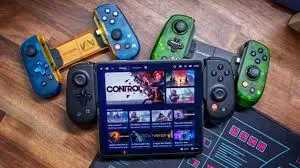
When I first started playing emulator games on PC, I honestly thought a keyboard would be enough. I mean, it works… technically. But after a few days of playing action and racing games, I realized something was off. The controls felt stiff, reaction time wasn’t great, and long sessions became uncomfortable.
That’s when I switched to a proper gaming controller, and trust me — emulator gaming never felt the same again.
In this article, I’ll share my real experience with gaming controllers and accessories for emulator gaming, along with practical advice on what actually works on PC and Android emulators.
Why Controllers Matter So Much in Emulator Gaming
Emulators are designed to recreate console experiences. Playing console-style games on a keyboard or touch screen just doesn’t feel natural.
From my own use, a controller instantly improves:
- Movement accuracy
- Button response
- Comfort during long sessions
Especially for PlayStation-style emulator games, a controller feels almost mandatory.
My Experience with Bluetooth vs USB Controllers
I’ve used both Bluetooth and USB controllers for emulator gaming, and each has its place.
Bluetooth Controllers (Wireless Freedom)
Bluetooth controllers are super convenient, especially on Android emulators.
What I liked:
- No cables
- Easy pairing
- Works well for casual gaming
What I noticed:
Sometimes, in fast-paced games, there can be slight input delay — not always noticeable, but it exists.
For RPGs and casual emulator games, Bluetooth controllers are perfectly fine.
USB Controllers (Best for Serious Emulator Gaming)
When I moved to USB controllers on PC emulators, the difference was immediate.
Why I still prefer USB for PC:
- Almost zero input lag
- Stable connection
- No battery worries
If you play action-heavy or racing emulator games, USB controllers are simply more reliable.
Console-Style Controllers Feel the Most Natural
From my testing, controllers that mimic console layouts work best with emulators.
Key things that matter:
- Dual analog sticks
- Comfortable grip
- Responsive triggers
These features make emulator games feel closer to original console gameplay, especially for PlayStation-based emulators.
Accessories That Actually Improve Emulator Gaming
Controllers are important, but a few accessories genuinely make a difference.
🎧 Gaming Headsets (Underrated but Important)
At first, I didn’t care much about audio. But once I switched to a proper gaming headset, gameplay felt more immersive.
Real benefits I noticed:
- Clear sound effects
- Better focus in action games
- Less distraction
For emulator gaming, audio feedback really helps with timing and reactions.
⌨️ Keyboard & Mouse for Strategy Games
Not all emulator games need controllers.
For strategy, simulation, and some RPG games, I still use:
- Gaming keyboard
- Responsive mouse
Custom key mapping inside emulators makes this setup very effective.
🧊 Cooling Accessories (Especially for Android Emulators)
Running emulators pushes hardware harder than normal apps.
From personal experience:
- My laptop used to heat up fast
- Android emulator performance dropped after long sessions
After improving cooling (external cooling pad), performance stayed stable much longer.
📱 Phone Stands & Mounts
This sounds simple, but it helps more than people think.
Using a proper stand:
- Reduces hand strain
- Improves viewing angle
- Makes long sessions comfortable
Small accessory, big comfort upgrade.
What I Look for Before Buying Emulator Accessories
After wasting money on random accessories in the past, I now focus on a few key things:
Compatibility
Always check if it supports:
- Windows
- Android
- Emulator button mapping
Build Quality
Cheap plastic controllers don’t last long. A slightly better build saves money in the long run.
Latency & Response
For emulator gaming, responsiveness matters more than fancy features.
Budget vs Premium – What’s Actually Worth It?
I’ve used both budget and premium accessories.
Budget Accessories
- Good for beginners
- Decent for casual gaming
- Limited durability
Premium Accessories
- Better grip
- Faster response
- Comfortable for long sessions
If you play emulator games regularly, spending a bit more is worth it.
Do Gaming Accessories Really Improve Emulator Gaming?
From my own experience — yes, absolutely.
They don’t improve emulator software performance, but they:
- Improve control accuracy
- Reduce fatigue
- Make gaming enjoyable
Once you get used to a good controller, it’s hard to go back.
Common Questions I Get About Emulator Controllers
Do all controllers work with emulators?
Most modern controllers work, but not all map perfectly without tweaking.
Is wireless good enough?
For casual gaming, yes. For competitive or fast games, wired is better.
Is a controller necessary?
Not mandatory, but highly recommended.
Final Thoughts (Honest Opinion)
After years of emulator gaming on PC and Android, I can confidently say that a good controller and basic accessories completely change the experience.
If you’re serious about emulator gaming, don’t rely only on keyboard or touch controls. Even a mid-range controller makes games feel smoother, more responsive, and closer to real console gameplay.
